The GitHub MCP server is available to all GitHub users regardless of plan type. However, specific tools within the MCP server inherit the same access requirements as their corresponding GitHub features. If a feature requires a paid GitHub or Copilot license, the equivalent MCP tool will require the same subscription. For example, tools that interact with Copilot cloud agent require a paid Copilot license.
关于 GitHub MCP 服务器
GitHub MCP 服务器是由GitHub提供和维护的模型上下文协议(MCP)服务器。 MCP 使你可以将 AI 功能集成到其他工具和服务中,通过提供基于上下文的 AI 辅助,提升你的开发体验。
有关 MCP 服务器的完整简介 GitHub 和 MCP 概述,请参阅 关于模型上下文协议 (MCP)。
Prerequisites
- A GitHub account.
- Visual Studio Code.
- The GitHub MCP server, configured in your editor. See Setting up the GitHub MCP Server.
- 如果你是具有 Copilot Business 或 Copilot Enterprise 计划的组织或企业的成员,则必须启用“MCP servers in Copilot”策略才能将 MCP 与 Copilot 配合使用。
Using the GitHub MCP server in Visual Studio Code
The GitHub MCP server enables you to perform a wide range of actions on GitHub, via Copilot Chat in Visual Studio Code.
- 单击标题栏中的Copilot Chat聊天图标打开Visual Studio Code。
- 在 Copilot Chat 框中,从代理下拉菜单中选择 “代理 ”。
- To see the available actions, in the Copilot Chat box, click the Configure tools icon.
- If you expand the GitHub MCP server entry, you will see a list of available tools.
- In the Copilot Chat box, type a command or question related to the action you want to perform, and press Enter.
- For example, you can ask the GitHub MCP server to create a new issue, list pull requests, or retrieve repository information.
- The GitHub MCP server will process your request and provide a response in the chat interface.
- In the Copilot Chat box, you may be asked to give additional permissions or provide more information to complete the action.
- Follow the prompts to complete the action.
故障排除
如果在使用 GitHub MCP 服务器时遇到问题,可以采取一些常见的故障排除步骤。
授权问题
如果你在授权 MCP 服务器时遇到问题,请确保:
- 你已在所选 IDE 中登录到 GitHub。
如果您使用 personal access token(PAT)进行身份验证,请确保:
- 你的 GitHub PAT 是有效的,并且具备你希望执行的操作所需的权限范围。
- 您输入的 PAT 正确。
Copilot 代理模式问题
如果您在使用 Copilot Chat 代理模式时遇到问题,请确保:
- 您已在 Copilot Chat 框中选择了正确的代理程序。
- 已在 IDE 中正确配置了 MCP 服务器。
- 你拥有执行目标操作所需的权限。
推送保护阻止
如果使用 GitHub MCP 服务器并推送保护会阻止你认为可以安全公开的机密,则可以通过指定允许机密的原因绕过阻止。 请参阅“使用推送保护和 GitHub MCP 服务器”。
一般提示
如果遇到 MCP 服务器的其他问题 GitHub ,可参阅以下一些常规提示来帮助你进行故障排除:
- 检查 MCP 服务器的输出日志,查看是否有任何错误信息。
- 如果你是在本地运行 MCP 服务器,请确保你的本地环境已正确设置为支持运行 Docker 容器。
- 尝试重启 MCP 服务器或 IDE。
关于 GitHub MCP 服务器
GitHub MCP 服务器是由GitHub提供和维护的模型上下文协议(MCP)服务器。 MCP 使你可以将 AI 功能集成到其他工具和服务中,通过提供基于上下文的 AI 辅助,提升你的开发体验。
有关 MCP 服务器的完整简介 GitHub 和 MCP 概述,请参阅 关于模型上下文协议 (MCP)。
Prerequisites
- Access to Copilot. 请参阅“关于GitHub Copilot”。
- Visual Studio version 17.14 or later. For more information on installing Visual Studio, see the Visual Studio downloads page.
- The GitHub MCP server, configured in your editor. See Setting up the GitHub MCP Server.
- Sign in to GitHub from Visual Studio.
- 如果你是具有 Copilot Business 或 Copilot Enterprise 计划的组织或企业的成员,则必须启用“MCP servers in Copilot”策略才能将 MCP 与 Copilot 配合使用。
Using the GitHub MCP server in Visual Studio
The GitHub MCP server enables you to perform a wide range of actions on GitHub, via Copilot Chat in Visual Studio.
- In the Visual Studio menu bar, click View, then click GitHub Copilot Chat.
- At the bottom of the chat panel, select Agent from the mode dropdown.
- In the Copilot Chat window, click the tools icon.
- Under GitHub, you will see a list of available tools.
- In the Copilot Chat box, type a command or question related to the action you want to perform, and press Enter.
- For example, you can ask the GitHub MCP server to create a new issue, list pull requests, or retrieve repository information.
- The GitHub MCP server will process your request and provide a response in the chat interface.
- In the Copilot Chat box, you may be asked to give additional permissions or provide more information to complete the action.
- Follow the prompts to complete the action.
关于 GitHub MCP 服务器
GitHub MCP 服务器是由GitHub提供和维护的模型上下文协议(MCP)服务器。 MCP 使你可以将 AI 功能集成到其他工具和服务中,通过提供基于上下文的 AI 辅助,提升你的开发体验。
有关 MCP 服务器的完整简介 GitHub 和 MCP 概述,请参阅 关于模型上下文协议 (MCP)。
Prerequisites
-
Access to Copilot. 请参阅“关于GitHub Copilot”。
-
A compatible JetBrains IDE. GitHub Copilot is compatible with the following IDEs:
- IntelliJ IDEA(旗舰版、社区版、教育版)
- Android Studio
- CLion
- Code With Me 来宾
- DataGrip
- DataSpell
- GoLand
- JetBrains 客户端
- MPS
- PhpStorm
- PyCharm(专业版、社区版、教育版)
- Rider
- RubyMine
- RustRover
- WebStorm
请参阅 JetBrains IDE 工具查找器进行下载。
-
最新版本的 GitHub Copilot 扩展。 请在 JetBrains Marketplace 中查看GitHub Copilot插件。 有关安装说明,请参阅“Installing the GitHub Copilot extension in your environment”。
-
登录到 GitHub JetBrains IDE。 有关身份验证说明,请参阅“Installing the GitHub Copilot extension in your environment”。
-
The GitHub MCP server, configured in your editor. See Setting up the GitHub MCP Server.
-
如果你是具有 Copilot Business 或 Copilot Enterprise 计划的组织或企业的成员,则必须启用“MCP servers in Copilot”策略才能将 MCP 与 Copilot 配合使用。
Using the GitHub MCP server in JetBrains IDEs
The GitHub MCP server enables you to perform a wide range of actions on GitHub, via Copilot Chat in JetBrains IDEs.
-
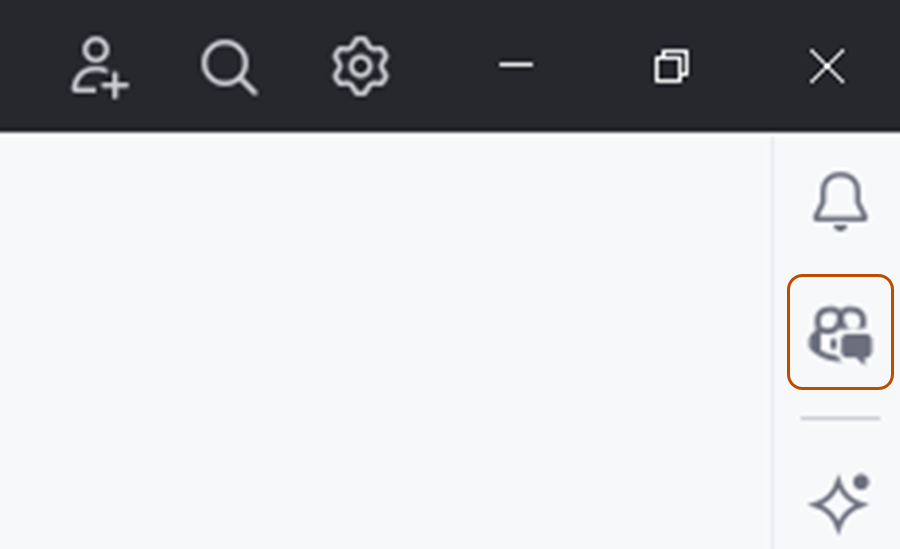
Open the Copilot Chat window by clicking the GitHub Copilot Chat icon at the right side of the JetBrains IDE window.
-
At the top of the chat panel, click the Agent tab.
-
To see the available actions, in the Copilot Chat box, click the tools icon.
- You will see a list of available actions from the GitHub MCP server.
-
In the Copilot Chat box, type a command or question related to the action you want to perform, and press Enter.
- For example, you can ask the GitHub MCP server to create a new issue, list pull requests, or retrieve repository information.
-
The GitHub MCP server will process your request and provide a response in the chat interface.
- In the Copilot Chat box, you may be asked to give additional permissions or provide more information to complete the action.
-
Follow the prompts to complete the action.

故障排除
如果在使用 GitHub MCP 服务器时遇到问题,可以采取一些常见的故障排除步骤。
授权问题
如果你在授权 MCP 服务器时遇到问题,请确保:
- 你已在所选 IDE 中登录到 GitHub。
如果您使用 personal access token(PAT)进行身份验证,请确保:
- 你的 GitHub PAT 是有效的,并且具备你希望执行的操作所需的权限范围。
- 您输入的 PAT 正确。
Copilot 代理模式问题
如果您在使用 Copilot Chat 代理模式时遇到问题,请确保:
- 您已在 Copilot Chat 框中选择了正确的代理程序。
- 已在 IDE 中正确配置了 MCP 服务器。
- 你拥有执行目标操作所需的权限。
推送保护阻止
如果使用 GitHub MCP 服务器并推送保护会阻止你认为可以安全公开的机密,则可以通过指定允许机密的原因绕过阻止。 请参阅“使用推送保护和 GitHub MCP 服务器”。
一般提示
如果遇到 MCP 服务器的其他问题 GitHub ,可参阅以下一些常规提示来帮助你进行故障排除:
- 检查 MCP 服务器的输出日志,查看是否有任何错误信息。
- 如果你是在本地运行 MCP 服务器,请确保你的本地环境已正确设置为支持运行 Docker 容器。
- 尝试重启 MCP 服务器或 IDE。
关于 GitHub MCP 服务器
GitHub MCP 服务器是由GitHub提供和维护的模型上下文协议(MCP)服务器。 MCP 使你可以将 AI 功能集成到其他工具和服务中,通过提供基于上下文的 AI 辅助,提升你的开发体验。
有关 MCP 服务器的完整简介 GitHub 和 MCP 概述,请参阅 关于模型上下文协议 (MCP)。
Prerequisites
- Access to Copilot. 请参阅“关于GitHub Copilot”。
- GitHub Copilot for Xcode extension. See Installing the GitHub Copilot extension in your environment.
- The GitHub MCP server, configured in your editor. See Setting up the GitHub MCP Server.
- 如果你是具有 Copilot Business 或 Copilot Enterprise 计划的组织或企业的成员,则必须启用“MCP servers in Copilot”策略才能将 MCP 与 Copilot 配合使用。
Using the GitHub MCP server in Xcode
The GitHub MCP server enables you to perform a wide range of actions on GitHub, via Copilot Chat in Xcode.
- To open the chat view, click Editor in the menu bar, then click Copilot then Open Chat. Copilot Chat opens in a new window.
- At the bottom of the chat panel, select Agent.
- To see the available actions, in the Copilot Chat box, click the tools icon.
- You will see a list of available actions from the GitHub MCP server.
- In the Copilot Chat box, type a command or question related to the action you want to perform, and press Enter.
- For example, you can ask the GitHub MCP server to create a new issue, list pull requests, or retrieve repository information.
- The GitHub MCP server will process your request and provide a response in the chat interface.
- In the Copilot Chat box, you may be asked to give additional permissions or provide more information to complete the action.
- Follow the prompts to complete the action.
故障排除
如果在使用 GitHub MCP 服务器时遇到问题,可以采取一些常见的故障排除步骤。
授权问题
如果你在授权 MCP 服务器时遇到问题,请确保:
- 你已在所选 IDE 中登录到 GitHub。
如果您使用 personal access token(PAT)进行身份验证,请确保:
- 你的 GitHub PAT 是有效的,并且具备你希望执行的操作所需的权限范围。
- 您输入的 PAT 正确。
Copilot 代理模式问题
如果您在使用 Copilot Chat 代理模式时遇到问题,请确保:
- 您已在 Copilot Chat 框中选择了正确的代理程序。
- 已在 IDE 中正确配置了 MCP 服务器。
- 你拥有执行目标操作所需的权限。
推送保护阻止
如果使用 GitHub MCP 服务器并推送保护会阻止你认为可以安全公开的机密,则可以通过指定允许机密的原因绕过阻止。 请参阅“使用推送保护和 GitHub MCP 服务器”。
一般提示
如果遇到 MCP 服务器的其他问题 GitHub ,可参阅以下一些常规提示来帮助你进行故障排除:
- 检查 MCP 服务器的输出日志,查看是否有任何错误信息。
- 如果你是在本地运行 MCP 服务器,请确保你的本地环境已正确设置为支持运行 Docker 容器。
- 尝试重启 MCP 服务器或 IDE。
关于 GitHub MCP 服务器
GitHub MCP 服务器是由GitHub提供和维护的模型上下文协议(MCP)服务器。 MCP 使你可以将 AI 功能集成到其他工具和服务中,通过提供基于上下文的 AI 辅助,提升你的开发体验。
有关 MCP 服务器的完整简介 GitHub 和 MCP 概述,请参阅 关于模型上下文协议 (MCP)。
Prerequisites
- 对 Copilot 的访问权限****。 请参阅“关于GitHub Copilot”。
- 兼容的 Eclipse 版本****。 若要使用 GitHub Copilot 扩展,必须拥有 Eclipse 版本 2024-09 或更高版本。 请参阅 Eclipse 下载页。
- 如果你是具有 Copilot Business 或 Copilot Enterprise 计划的组织或企业的成员,则必须启用“MCP servers in Copilot”策略才能将 MCP 与 Copilot 配合使用。
- The GitHub MCP server, configured in your editor. See Setting up the GitHub MCP Server.
- Latest version of the GitHub Copilot extension. Download this from the Eclipse Marketplace. For more information, see Installing the GitHub Copilot extension in your environment.
- Sign in to GitHub from Eclipse.
Using the GitHub MCP server in Eclipse
The GitHub MCP server enables you to perform a wide range of actions on GitHub, via Copilot Chat in Eclipse.
- To open the Copilot Chat panel, click the Copilot icon () in the status bar at the bottom of Eclipse, then click Open Chat.
- At the bottom of the chat panel, select Agent from the mode dropdown.
- To see the available actions, in the Copilot Chat box, click the tools icon.
- Under
github, you will see a list of available actions.
- Under
- In the Copilot Chat box, type a command or question related to the action you want to perform, and press Enter.
- For example, you can ask the GitHub MCP server to create a new issue, list pull requests, or retrieve repository information.
- The GitHub MCP server will process your request and provide a response in the chat interface.
- In the Copilot Chat box, you may be asked to give additional permissions or provide more information to complete the action.
- Follow the prompts to complete the action.
故障排除
如果在使用 GitHub MCP 服务器时遇到问题,可以采取一些常见的故障排除步骤。
授权问题
如果你在授权 MCP 服务器时遇到问题,请确保:
- 你已在所选 IDE 中登录到 GitHub。
如果您使用 personal access token(PAT)进行身份验证,请确保:
- 你的 GitHub PAT 是有效的,并且具备你希望执行的操作所需的权限范围。
- 您输入的 PAT 正确。
Copilot 代理模式问题
如果您在使用 Copilot Chat 代理模式时遇到问题,请确保:
- 您已在 Copilot Chat 框中选择了正确的代理程序。
- 已在 IDE 中正确配置了 MCP 服务器。
- 你拥有执行目标操作所需的权限。
推送保护阻止
如果使用 GitHub MCP 服务器并推送保护会阻止你认为可以安全公开的机密,则可以通过指定允许机密的原因绕过阻止。 请参阅“使用推送保护和 GitHub MCP 服务器”。
一般提示
如果遇到 MCP 服务器的其他问题 GitHub ,可参阅以下一些常规提示来帮助你进行故障排除:
- 检查 MCP 服务器的输出日志,查看是否有任何错误信息。
- 如果你是在本地运行 MCP 服务器,请确保你的本地环境已正确设置为支持运行 Docker 容器。
- 尝试重启 MCP 服务器或 IDE。