This version of this article is for Copilot in JetBrains IDEs. For Copilot on other platforms, click the appropriate tab above.
This version of this article is for Copilot in Visual Studio Code. For Copilot on other platforms, click the appropriate tab above.
This version of this article is for Copilot on the GitHub website. For Copilot on other platforms, click the appropriate tab above.
This version of this article is for Copilot in Visual Studio. For Copilot on other platforms, click the appropriate tab above.
Introduction
If you allow GitHub Copilot to make suggestions that match publicly available code or use a product that does not support "Block" mode, Copilot will display references to any similar code that is found. See référence de code GitHub Copilot.
Prerequisites
References to matching code are only generated if you use a product that does not support "Block" mode, or if Copilot is configured to allow suggestions that match publicly available code. This is configured in either your personal or organization settings.
For more information, see Gestion des stratégies de GitHub Copilot en tant qu’abonné individuel or Gestion des stratégies et des fonctionnalités pour GitHub Copilot dans votre organisation.
View code references for inline suggestions
You can view code references in the log file for your JetBrains IDE.
-
In your JetBrains IDE, select Help > Show Log in Finder/Explorer.
The log file is displayed in your file manager. For example, for IntelliJ IDEA the log file is called
idea.log. -
Open the log file in your JetBrains IDE.
-
Search for "[Public Code References]."
Example log entry
2025-02-26 09:22:12,045 [5581906] INFO - #copilot - [Public Code References] Text found matching public code in file:///Users/mona-lisa/git-repos/test-repo/fizzbuzz.js [Ln 1, Col 10] near fizzBuzz() ...:
  1) [NOASSERTION] https://github.com/nixsticks/todos/blob/ae427a721c7784da64a619ba17f60637fe1cc819/Loops/fizzbuzz/fizzbuzz.js
  2) [GPL-3.0] https://github.com/voloslg/algocasts/blob/34b423517486f908ca167b390d3b8bd05653829f/exercises/fizzbuzz/index.js
The log entry includes the following details:
- The date and time you accepted the suggestion.
- A "Public Code References" message telling you that similar code was found.
- The path to the file in which the suggestion was added.
- The line and column number where the suggestion was added.
- A list of matches, including:
- The license type for the matching code—or
NOASSERTIONif no license was found. - The URL of the file on GitHub.com where the matching code was found.
- The license type for the matching code—or
Verifying the code referencing functionality
Vous pouvez vérifier que le référencement du code fonctionne en demandant à Copilot d’ajouter du code couramment utilisé et en vérifiant la sortie dans le journal.
-
Créez un fichier appelé
fizz-buzz.jset ouvrez-le dans l’éditeur. -
Affichez le journal comme décrit dans la section précédente.
-
Dans l’éditeur, tapez :
function fizzBuzz()Avec un espace après la parenthèse fermante.
GitHub Copilot doit suggérer du code pour terminer la fonction. Généralement, la suggestion sera une implémentation commune de l'algorithme fizz buzz qui correspondra au code disponible publiquement sur le site web GitHub.
-
Pour accepter la suggestion, appuyez sur Tab.
-
Vérifiez si des entrées pour un code similaire ont été ajoutées au journal.
View code references for inline suggestions
You can find code references in one of the GitHub Copilot logs in Visual Studio Code.
-
In Visual Studio Code, open the Output window by selecting View > Output from the menu bar.
-
In the dropdown menu at the right of the Output window, select GitHub Copilot Log (Code References).
-
Leave the GitHub Copilot Log (Code References) view displayed while you use GitHub Copilot in Visual Studio Code.
When you accept an inline suggestion that matches code in a public GitHub repository, an entry is added to the log.
The log entry includes the following details:
- The date and time you accepted the suggestion.
- The name of the file in which the suggestion was added.
- "Similar code at" followed by the location in the file where the suggestion was added.
- An extract of the code that was added by the inline suggestion.
- The license type for the matching code, if found, otherwise
unknown. - The URL of the file on GitHub.com where the similar code was found.
Example log entry
2025-03-27 12:17:54.759 [info] file:///Users/monalisa/fizzbuzz.js Similar code at  [Ln 2, Col 8] let i = 1; i <= 100; i++) {  let output = '';  if (i % 3 === 0) {  output += 'Fizz';...
2025-03-27 12:17:54.759 [info] License: unknown, URL: https://github.com/octo-org/octo-repo/blob/8563f3b1d4f33952b22212b86e745539d1567ed1/examples/fizzBuzz.js
2025-03-27 12:17:54.759 [info] License: MIT, URL: https://github.com/octo-org/monalisa/blob/7e974691f4c8e6bc55f9b50688f05d746d1bc52b/exercises/2/fizz-buzz.js
Verifying the code referencing functionality
Vous pouvez vérifier que le référencement du code fonctionne en demandant à Copilot d’ajouter du code couramment utilisé et en vérifiant la sortie dans le journal.
-
Créez un fichier appelé
fizz-buzz.jset ouvrez-le dans l’éditeur. -
Affichez le journal comme décrit dans la section précédente.
-
Dans l’éditeur, tapez :
function fizzBuzz()Avec un espace après la parenthèse fermante.
GitHub Copilot doit suggérer du code pour terminer la fonction. Généralement, la suggestion sera une implémentation commune de l'algorithme fizz buzz qui correspondra au code disponible publiquement sur le site web GitHub.
-
Pour accepter la suggestion, appuyez sur Tab.
-
Vérifiez si des entrées pour un code similaire ont été ajoutées au journal.
View code references for inline suggestions
You can find code references in the GitHub Copilot log in Visual Studio.
-
In the menu bar, click View.
-
In the dropdown menu, click Output.
-
In Output view, click the box to the right of "Show output from" and select GitHub Copilot.
-
Leave the log displayed while you use GitHub Copilot in Visual Studio Code.
When you accept an inline suggestion that matches code in a public GitHub repository, an entry is added to the log.
The log entry includes the following details:
- The time you accepted the suggestion. Click the "Show Timestamp" clock icon if the time is not displayed.
- The description
[Completions Public Code Match Information]. - The license type for the matching code, if found, otherwise
NOASSERTION. - The URL of the file on GitHub.com where the similar code was found.
Example log entry
09:39:16:203 [Completions Public Code Match Information] Similar code with license type [MIT] https://github.com/octo-org/octo-repo/blob/34deb75eb6a2e22483ed465a6aec38c02eb2536e/routines/quicksort.js
Verifying the code referencing functionality
Vous pouvez vérifier que le référencement du code fonctionne en demandant à Copilot d’ajouter du code couramment utilisé et en vérifiant la sortie dans le journal.
-
Créez un fichier appelé
fizz-buzz.jset ouvrez-le dans l’éditeur. -
Affichez le journal comme décrit dans la section précédente.
-
Dans l’éditeur, tapez :
function fizzBuzz()Avec un espace après la parenthèse fermante.
GitHub Copilot doit suggérer du code pour terminer la fonction. Généralement, la suggestion sera une implémentation commune de l'algorithme fizz buzz qui correspondra au code disponible publiquement sur le site web GitHub.
-
Pour accepter la suggestion, appuyez sur Tab.
-
Vérifiez si des entrées pour un code similaire ont été ajoutées au journal.
View code references for Copilot Chat
Si une réponse dans Copilot Chat contient du code correspondant, cela est indiqué à la fin de la réponse par le texte suivant :
Code similaire trouvé avec n types de licences – Afficher les correspondances
-
Cliquez sur Afficher les correspondances pour afficher les détails du code correspondant dans un nouvel onglet de l’éditeur.
Pour chaque exemple de code correspondant, l’éditeur affiche :
- Type de licence pour le code correspondant, s’il est connu.
- L’URL du fichier sur GitHub.com où le code correspondant a été trouvé.
- Extrait de code montrant le code correspondant.
-
Dans l’éditeur, Ctrl+clic (Windows/Linux) ou Command+clic (Mac) sur une URL pour afficher le fichier complet sur GitHub.com.
Si une réponse dans Copilot Chat contient du code correspondant, cela est indiqué à la fin de la réponse par le texte suivant :
Code similaire trouvé avec n types de licences – Afficher les correspondances
-
Cliquez sur Afficher les correspondances pour afficher les détails du code correspondant dans un nouvel onglet de l’éditeur.
Pour chaque exemple de code correspondant, l’éditeur affiche :
- Type de licence pour le code correspondant, s’il est connu.
- L’URL du fichier sur GitHub.com où le code correspondant a été trouvé.
- Extrait de code montrant le code correspondant.
-
Dans l’éditeur, Ctrl+clic (Windows/Linux) ou Command+clic (Mac) sur une URL pour afficher le fichier complet sur GitHub.com.
If a response in Copilot Chat includes matching code, this is below the suggested code by the following text:
Found similar code in public repos. View matches
Click View matches to open the GitHub Copilot log, if it is not already open, and add details of the matched code.
The details include:
- The time you added the details to the log. Click the "Show Timestamp" clock icon if the time is not displayed.
- The description
[Code Match]as the first log entry before the list of matching code. - The license type—if found—for each instance of similar code.
- The URL of the file on GitHub.com where the matching code was found.
- A code snippet showing the matching code.
Logging example
09:24:10:525	[Code Match] Similar code with 2 license type(s) [MIT, NOASSERTION]
09:24:10:525	## License: MIT
09:24:10:525	https://github.com/octo-org/octo-repo/tree/127aac4ab27a42706af01be80f7aae3b83f44fbc/buzzfizz.py
09:24:10:525	```
09:24:10:525	for i in range(1, n + 1):
09:24:10:525	        if i % 3 == 0 and i % 5 == 0:
09:24:10:525	            print('FizzBuzz')
09:24:10:525	        elif i % 3 == 0:
09:24:10:525	            print('Fizz')
09:24:10:525	        elif i % 5 == 0:
09:24:10:525	```
09:24:10:525	## License: NOASSERTION
09:24:10:525	https://github.com/octo-org/monalisa/tree/011308746e53b26b128fa53c044a2527c39231f0/fizz-buzz.py
09:24:10:525	```
09:24:10:525	i % 3 == 0 and i % 5 == 0:
09:24:10:525	            print('FizzBuzz')
09:24:10:525	        elif i % 3 == 0:
09:24:10:525	            print('Fizz')
09:24:10:525	        elif i % 5 == 0:
09:24:10:525	            print('Buzz')
09:24:10:525	        else:
09:24:10:525	            print(i)
09:24:10:525	```
View code references for Copilot Chat
When Copilot Chat provides a response that includes code that matches code in a public GitHub repository, this is indicated beneath the code suggestion:
< > Public code references from n repositories
To see details of the matching code:
-
Click the "Public code references..." text, under the code suggestion.
A list of GitHub repositories containing matching code is displayed in a dropdown, together with licensing information, if found.
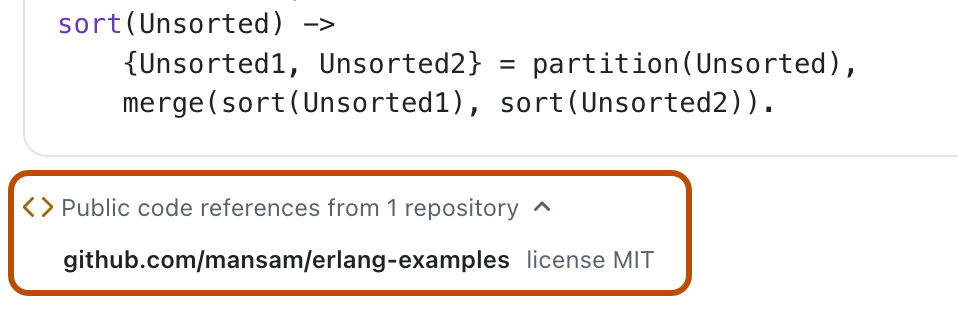
-
Click the name of a repository to display that repository on GitHub.com.

View code references for Copilot cloud agent
When Copilot provides a response that includes code that matches code in a public GitHub repository, this is indicated in the agent session logs with a link to display details of the matched code. For more information, see Gestion des sessions des agents.