The GitHub MCP server is available to all GitHub users regardless of plan type. However, specific tools within the MCP server inherit the same access requirements as their corresponding GitHub features. If a feature requires a paid GitHub or Copilot license, the equivalent MCP tool will require the same subscription. For example, tools that interact with Copilot cloud agent require a paid Copilot license.
MCP 서버 정보 GitHub
GitHub MCP 서버는 MCP(모델 컨텍스트 프로토콜) 서버가 제공하고 유지 관리합니다GitHub. MCP를 사용하면 AI 기능을 다른 도구 및 서비스와 통합하여 컨텍스트에 맞는 AI 지원을 제공하여 개발 환경을 향상시킬 수 있습니다.
MCP 서버에 대한 GitHub 전체 소개 및 MCP 개요는 모델 컨텍스트 프로토콜(MCP) 정보을 참조하세요.
Prerequisites
- A GitHub account.
- Visual Studio Code.
- The GitHub MCP server, configured in your editor. See Setting up the GitHub MCP Server.
- Copilot Business 또는 Copilot Enterprise 플랜을 사용하는 조직이나 엔터프라이즈의 구성원인 경우, Copilot에서 MCP를 사용하려면 "Copilot의 MCP 서버" 정책을 활성화해야 합니다.
Using the GitHub MCP server in Visual Studio Code
The GitHub MCP server enables you to perform a wide range of actions on GitHub, via Copilot Chat in Visual Studio Code.
- 제목 표시줄Copilot Chat에서 채팅 아이콘을 클릭하여 엽니다Visual Studio Code.
- 상자의 Copilot Chat 에이전트 드롭다운 메뉴에서 에이전트 를 선택합니다.
- To see the available actions, in the Copilot Chat box, click the Configure tools icon.
- If you expand the GitHub MCP server entry, you will see a list of available tools.
- In the Copilot Chat box, type a command or question related to the action you want to perform, and press Enter.
- For example, you can ask the GitHub MCP server to create a new issue, list pull requests, or retrieve repository information.
- The GitHub MCP server will process your request and provide a response in the chat interface.
- In the Copilot Chat box, you may be asked to give additional permissions or provide more information to complete the action.
- Follow the prompts to complete the action.
문제 해결
MCP 서버를 사용하는 GitHub 동안 문제가 발생하는 경우 수행할 수 있는 몇 가지 일반적인 문제 해결 단계가 있습니다.
권한 부여 문제
MCP 서버 인증에 문제가 있는 경우, 다음을 확인합니다.
- 선택한 IDE에서 GitHub에 로그인되어 있습니다.
personal access token (PAT)로 인증하는 경우 다음을 확인하세요:
- GitHub PAT는 유효하며 수행하려는 작업에 필요한 범위를 갖추고 있습니다.
- 올바른 PAT를 입력했습니다.
Copilot 에이전트 모드 문제
에이전트 모드에 Copilot Chat 문제가 있는 경우 다음을 확인합니다.
- 올바른 에이전트가 Copilot Chat 상자에 선택되어 있습니다.
- IDE에서 MCP 서버를 올바르게 구성했습니다.
- 실행하려는 작업을 수행하는 데 필요한 권한이 있습니다.
푸시 보호 차단
GitHub MCP 서버를 사용 중인데 푸시 보호에서 노출해도 안전하다고 판단되는 비밀 정보를 차단하는 경우, 해당 비밀 정보를 허용하는 이유를 지정하여 차단을 우회할 수 있습니다. 푸시 보호 및 GitHub MCP 서버 작업을(를) 참조하세요.
일반 팁
MCP 서버에 다른 문제가 GitHub 발생하는 경우 문제를 해결하는 데 도움이 되는 몇 가지 일반적인 팁은 다음과 같습니다.
- MCP 서버의 출력 로그에서 오류 메시지를 확인하세요.
- 로컬에서 MCP 서버를 실행하는 경우 Docker 컨테이너를 실행하기 위해 로컬 환경이 올바르게 설정되었는지 확인하세요.
- MCP 서버 또는 IDE를 다시 시작해 보세요.
MCP 서버 정보 GitHub
GitHub MCP 서버는 MCP(모델 컨텍스트 프로토콜) 서버가 제공하고 유지 관리합니다GitHub. MCP를 사용하면 AI 기능을 다른 도구 및 서비스와 통합하여 컨텍스트에 맞는 AI 지원을 제공하여 개발 환경을 향상시킬 수 있습니다.
MCP 서버에 대한 GitHub 전체 소개 및 MCP 개요는 모델 컨텍스트 프로토콜(MCP) 정보을 참조하세요.
Prerequisites
- Access to Copilot. GitHub Copilot 소개을(를) 참조하세요.
- Visual Studio version 17.14 or later. For more information on installing Visual Studio, see the Visual Studio downloads page.
- The GitHub MCP server, configured in your editor. See Setting up the GitHub MCP Server.
- Sign in to GitHub from Visual Studio.
- Copilot Business 또는 Copilot Enterprise 플랜을 사용하는 조직이나 엔터프라이즈의 구성원인 경우, Copilot에서 MCP를 사용하려면 "Copilot의 MCP 서버" 정책을 활성화해야 합니다.
Using the GitHub MCP server in Visual Studio
The GitHub MCP server enables you to perform a wide range of actions on GitHub, via Copilot Chat in Visual Studio.
- In the Visual Studio menu bar, click View, then click GitHub Copilot Chat.
- At the bottom of the chat panel, select Agent from the mode dropdown.
- In the Copilot Chat window, click the tools icon.
- Under GitHub, you will see a list of available tools.
- In the Copilot Chat box, type a command or question related to the action you want to perform, and press Enter.
- For example, you can ask the GitHub MCP server to create a new issue, list pull requests, or retrieve repository information.
- The GitHub MCP server will process your request and provide a response in the chat interface.
- In the Copilot Chat box, you may be asked to give additional permissions or provide more information to complete the action.
- Follow the prompts to complete the action.
MCP 서버 정보 GitHub
GitHub MCP 서버는 MCP(모델 컨텍스트 프로토콜) 서버가 제공하고 유지 관리합니다GitHub. MCP를 사용하면 AI 기능을 다른 도구 및 서비스와 통합하여 컨텍스트에 맞는 AI 지원을 제공하여 개발 환경을 향상시킬 수 있습니다.
MCP 서버에 대한 GitHub 전체 소개 및 MCP 개요는 모델 컨텍스트 프로토콜(MCP) 정보을 참조하세요.
Prerequisites
-
Access to Copilot. GitHub Copilot 소개을(를) 참조하세요.
-
A compatible JetBrains IDE. GitHub Copilot is compatible with the following IDEs:
- IntelliJ IDEA(Ultimate, Community, Educational)
- Android Studio
- CLion
- Code With Me 게스트
- DataGrip
- DataSpell
- GoLand
- JetBrains 클라이언트
- MPS
- PhpStorm
- PyCharm(Professional, Community, Educational)
- Rider
- RubyMine
- RustRover
- WebStorm
다운로드할 JetBrains IDE 도구 찾기를 참조하세요.
-
확장의 최신 버전입니다GitHub Copilot. JetBrains Marketplace의 플러그 인을 참조하세요.GitHub Copilot 설치 지침은 Installing the GitHub Copilot extension in your environment을(를) 참조하세요.
-
GitHub JetBrains IDE에 로그인합니다. 인증 지침은 Installing the GitHub Copilot extension in your environment을(를) 참조하세요.
-
The GitHub MCP server, configured in your editor. See Setting up the GitHub MCP Server.
-
Copilot Business 또는 Copilot Enterprise 플랜을 사용하는 조직이나 엔터프라이즈의 구성원인 경우, Copilot에서 MCP를 사용하려면 "Copilot의 MCP 서버" 정책을 활성화해야 합니다.
Using the GitHub MCP server in JetBrains IDEs
The GitHub MCP server enables you to perform a wide range of actions on GitHub, via Copilot Chat in JetBrains IDEs.
-
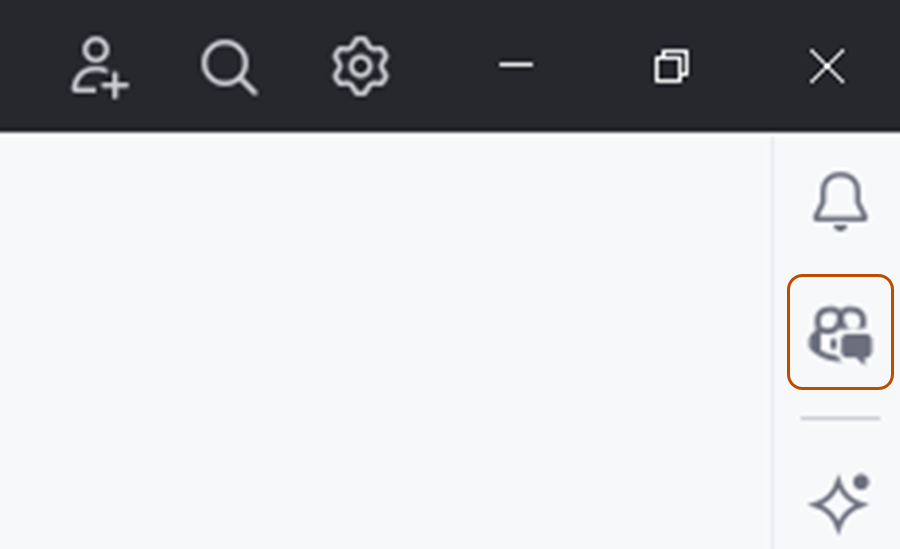
Open the Copilot Chat window by clicking the GitHub Copilot Chat icon at the right side of the JetBrains IDE window.
-
At the top of the chat panel, click the Agent tab.
-
To see the available actions, in the Copilot Chat box, click the tools icon.
- You will see a list of available actions from the GitHub MCP server.
-
In the Copilot Chat box, type a command or question related to the action you want to perform, and press Enter.
- For example, you can ask the GitHub MCP server to create a new issue, list pull requests, or retrieve repository information.
-
The GitHub MCP server will process your request and provide a response in the chat interface.
- In the Copilot Chat box, you may be asked to give additional permissions or provide more information to complete the action.
-
Follow the prompts to complete the action.

문제 해결
MCP 서버를 사용하는 GitHub 동안 문제가 발생하는 경우 수행할 수 있는 몇 가지 일반적인 문제 해결 단계가 있습니다.
권한 부여 문제
MCP 서버 인증에 문제가 있는 경우, 다음을 확인합니다.
- 선택한 IDE에서 GitHub에 로그인되어 있습니다.
personal access token (PAT)로 인증하는 경우 다음을 확인하세요:
- GitHub PAT는 유효하며 수행하려는 작업에 필요한 범위를 갖추고 있습니다.
- 올바른 PAT를 입력했습니다.
Copilot 에이전트 모드 문제
에이전트 모드에 Copilot Chat 문제가 있는 경우 다음을 확인합니다.
- 올바른 에이전트가 Copilot Chat 상자에 선택되어 있습니다.
- IDE에서 MCP 서버를 올바르게 구성했습니다.
- 실행하려는 작업을 수행하는 데 필요한 권한이 있습니다.
푸시 보호 차단
GitHub MCP 서버를 사용 중인데 푸시 보호에서 노출해도 안전하다고 판단되는 비밀 정보를 차단하는 경우, 해당 비밀 정보를 허용하는 이유를 지정하여 차단을 우회할 수 있습니다. 푸시 보호 및 GitHub MCP 서버 작업을(를) 참조하세요.
일반 팁
MCP 서버에 다른 문제가 GitHub 발생하는 경우 문제를 해결하는 데 도움이 되는 몇 가지 일반적인 팁은 다음과 같습니다.
- MCP 서버의 출력 로그에서 오류 메시지를 확인하세요.
- 로컬에서 MCP 서버를 실행하는 경우 Docker 컨테이너를 실행하기 위해 로컬 환경이 올바르게 설정되었는지 확인하세요.
- MCP 서버 또는 IDE를 다시 시작해 보세요.
MCP 서버 정보 GitHub
GitHub MCP 서버는 MCP(모델 컨텍스트 프로토콜) 서버가 제공하고 유지 관리합니다GitHub. MCP를 사용하면 AI 기능을 다른 도구 및 서비스와 통합하여 컨텍스트에 맞는 AI 지원을 제공하여 개발 환경을 향상시킬 수 있습니다.
MCP 서버에 대한 GitHub 전체 소개 및 MCP 개요는 모델 컨텍스트 프로토콜(MCP) 정보을 참조하세요.
Prerequisites
- Access to Copilot. GitHub Copilot 소개을(를) 참조하세요.
- GitHub Copilot for Xcode extension. See Installing the GitHub Copilot extension in your environment.
- The GitHub MCP server, configured in your editor. See Setting up the GitHub MCP Server.
- Copilot Business 또는 Copilot Enterprise 플랜을 사용하는 조직이나 엔터프라이즈의 구성원인 경우, Copilot에서 MCP를 사용하려면 "Copilot의 MCP 서버" 정책을 활성화해야 합니다.
Using the GitHub MCP server in Xcode
The GitHub MCP server enables you to perform a wide range of actions on GitHub, via Copilot Chat in Xcode.
- To open the chat view, click Editor in the menu bar, then click Copilot then Open Chat. Copilot Chat opens in a new window.
- At the bottom of the chat panel, select Agent.
- To see the available actions, in the Copilot Chat box, click the tools icon.
- You will see a list of available actions from the GitHub MCP server.
- In the Copilot Chat box, type a command or question related to the action you want to perform, and press Enter.
- For example, you can ask the GitHub MCP server to create a new issue, list pull requests, or retrieve repository information.
- The GitHub MCP server will process your request and provide a response in the chat interface.
- In the Copilot Chat box, you may be asked to give additional permissions or provide more information to complete the action.
- Follow the prompts to complete the action.
문제 해결
MCP 서버를 사용하는 GitHub 동안 문제가 발생하는 경우 수행할 수 있는 몇 가지 일반적인 문제 해결 단계가 있습니다.
권한 부여 문제
MCP 서버 인증에 문제가 있는 경우, 다음을 확인합니다.
- 선택한 IDE에서 GitHub에 로그인되어 있습니다.
personal access token (PAT)로 인증하는 경우 다음을 확인하세요:
- GitHub PAT는 유효하며 수행하려는 작업에 필요한 범위를 갖추고 있습니다.
- 올바른 PAT를 입력했습니다.
Copilot 에이전트 모드 문제
에이전트 모드에 Copilot Chat 문제가 있는 경우 다음을 확인합니다.
- 올바른 에이전트가 Copilot Chat 상자에 선택되어 있습니다.
- IDE에서 MCP 서버를 올바르게 구성했습니다.
- 실행하려는 작업을 수행하는 데 필요한 권한이 있습니다.
푸시 보호 차단
GitHub MCP 서버를 사용 중인데 푸시 보호에서 노출해도 안전하다고 판단되는 비밀 정보를 차단하는 경우, 해당 비밀 정보를 허용하는 이유를 지정하여 차단을 우회할 수 있습니다. 푸시 보호 및 GitHub MCP 서버 작업을(를) 참조하세요.
일반 팁
MCP 서버에 다른 문제가 GitHub 발생하는 경우 문제를 해결하는 데 도움이 되는 몇 가지 일반적인 팁은 다음과 같습니다.
- MCP 서버의 출력 로그에서 오류 메시지를 확인하세요.
- 로컬에서 MCP 서버를 실행하는 경우 Docker 컨테이너를 실행하기 위해 로컬 환경이 올바르게 설정되었는지 확인하세요.
- MCP 서버 또는 IDE를 다시 시작해 보세요.
MCP 서버 정보 GitHub
GitHub MCP 서버는 MCP(모델 컨텍스트 프로토콜) 서버가 제공하고 유지 관리합니다GitHub. MCP를 사용하면 AI 기능을 다른 도구 및 서비스와 통합하여 컨텍스트에 맞는 AI 지원을 제공하여 개발 환경을 향상시킬 수 있습니다.
MCP 서버에 대한 GitHub 전체 소개 및 MCP 개요는 모델 컨텍스트 프로토콜(MCP) 정보을 참조하세요.
Prerequisites
- Copilot에 액세스합니다. GitHub Copilot 소개을(를) 참조하세요.
- Eclipse의 호환 버전. GitHub Copilot 확장을 사용하려면 Eclipse 버전 2024-09 이상이 필요합니다. Eclipse 다운로드 페이지를 참조하세요.
- Copilot Business 또는 Copilot Enterprise 플랜을 사용하는 조직이나 엔터프라이즈의 구성원인 경우, Copilot에서 MCP를 사용하려면 "Copilot의 MCP 서버" 정책을 활성화해야 합니다.
- The GitHub MCP server, configured in your editor. See Setting up the GitHub MCP Server.
- Latest version of the GitHub Copilot extension. Download this from the Eclipse Marketplace. For more information, see Installing the GitHub Copilot extension in your environment.
- Sign in to GitHub from Eclipse.
Using the GitHub MCP server in Eclipse
The GitHub MCP server enables you to perform a wide range of actions on GitHub, via Copilot Chat in Eclipse.
- To open the Copilot Chat panel, click the Copilot icon () in the status bar at the bottom of Eclipse, then click Open Chat.
- At the bottom of the chat panel, select Agent from the mode dropdown.
- To see the available actions, in the Copilot Chat box, click the tools icon.
- Under
github, you will see a list of available actions.
- Under
- In the Copilot Chat box, type a command or question related to the action you want to perform, and press Enter.
- For example, you can ask the GitHub MCP server to create a new issue, list pull requests, or retrieve repository information.
- The GitHub MCP server will process your request and provide a response in the chat interface.
- In the Copilot Chat box, you may be asked to give additional permissions or provide more information to complete the action.
- Follow the prompts to complete the action.
문제 해결
MCP 서버를 사용하는 GitHub 동안 문제가 발생하는 경우 수행할 수 있는 몇 가지 일반적인 문제 해결 단계가 있습니다.
권한 부여 문제
MCP 서버 인증에 문제가 있는 경우, 다음을 확인합니다.
- 선택한 IDE에서 GitHub에 로그인되어 있습니다.
personal access token (PAT)로 인증하는 경우 다음을 확인하세요:
- GitHub PAT는 유효하며 수행하려는 작업에 필요한 범위를 갖추고 있습니다.
- 올바른 PAT를 입력했습니다.
Copilot 에이전트 모드 문제
에이전트 모드에 Copilot Chat 문제가 있는 경우 다음을 확인합니다.
- 올바른 에이전트가 Copilot Chat 상자에 선택되어 있습니다.
- IDE에서 MCP 서버를 올바르게 구성했습니다.
- 실행하려는 작업을 수행하는 데 필요한 권한이 있습니다.
푸시 보호 차단
GitHub MCP 서버를 사용 중인데 푸시 보호에서 노출해도 안전하다고 판단되는 비밀 정보를 차단하는 경우, 해당 비밀 정보를 허용하는 이유를 지정하여 차단을 우회할 수 있습니다. 푸시 보호 및 GitHub MCP 서버 작업을(를) 참조하세요.
일반 팁
MCP 서버에 다른 문제가 GitHub 발생하는 경우 문제를 해결하는 데 도움이 되는 몇 가지 일반적인 팁은 다음과 같습니다.
- MCP 서버의 출력 로그에서 오류 메시지를 확인하세요.
- 로컬에서 MCP 서버를 실행하는 경우 Docker 컨테이너를 실행하기 위해 로컬 환경이 올바르게 설정되었는지 확인하세요.
- MCP 서버 또는 IDE를 다시 시작해 보세요.