This version of this article is for Copilot in JetBrains IDEs. For Copilot on other platforms, click the appropriate tab above.
This version of this article is for Copilot in Visual Studio Code. For Copilot on other platforms, click the appropriate tab above.
This version of this article is for Copilot on the GitHub website. For Copilot on other platforms, click the appropriate tab above.
This version of this article is for Copilot in Visual Studio. For Copilot on other platforms, click the appropriate tab above.
Introduction
If you allow GitHub Copilot to make suggestions that match publicly available code or use a product that does not support "Block" mode, Copilot will display references to any similar code that is found. See GitHub Copilot 코드 참조.
Prerequisites
References to matching code are only generated if you use a product that does not support "Block" mode, or if Copilot is configured to allow suggestions that match publicly available code. This is configured in either your personal or organization settings.
For more information, see GitHub Copilot 정책을 개별 구독자로 관리 or 조직의 GitHub Copilot 대한 정책 및 기능 관리.
View code references for inline suggestions
You can view code references in the log file for your JetBrains IDE.
-
In your JetBrains IDE, select Help > Show Log in Finder/Explorer.
The log file is displayed in your file manager. For example, for IntelliJ IDEA the log file is called
idea.log. -
Open the log file in your JetBrains IDE.
-
Search for "[Public Code References]."
Example log entry
2025-02-26 09:22:12,045 [5581906] INFO - #copilot - [Public Code References] Text found matching public code in file:///Users/mona-lisa/git-repos/test-repo/fizzbuzz.js [Ln 1, Col 10] near fizzBuzz() ...:
  1) [NOASSERTION] https://github.com/nixsticks/todos/blob/ae427a721c7784da64a619ba17f60637fe1cc819/Loops/fizzbuzz/fizzbuzz.js
  2) [GPL-3.0] https://github.com/voloslg/algocasts/blob/34b423517486f908ca167b390d3b8bd05653829f/exercises/fizzbuzz/index.js
The log entry includes the following details:
- The date and time you accepted the suggestion.
- A "Public Code References" message telling you that similar code was found.
- The path to the file in which the suggestion was added.
- The line and column number where the suggestion was added.
- A list of matches, including:
- The license type for the matching code—or
NOASSERTIONif no license was found. - The URL of the file on GitHub.com where the matching code was found.
- The license type for the matching code—or
Verifying the code referencing functionality
Copilot에게 자주 사용되는 코드를 추가하고 로그에서 출력을 검사하여 코드 참조가 작동하는지 확인할 수 있습니다.
-
fizz-buzz.js라는 파일을 만들고 편집기에서 엽니다. -
이전 섹션에 설명된 대로 로그를 표시합니다.
-
편집기에서 다음을 입력합니다.
function fizzBuzz()닫는 괄호 뒤의 공백을 사용합니다.
GitHub Copilot은(는) 함수를 완료하기 위한 코드를 제안해야 합니다. 일반적으로 제안은 GitHub 웹 사이트에서 공개적으로 사용할 수 있는 코드와 일치하는 피즈 버즈 알고리즘의 일반적인 구현입니다.
-
제안을 수락하려면 Tab 키를 누릅니다.
-
유사한 코드에 대한 항목이 로그에 추가되었는지 확인합니다.
View code references for inline suggestions
You can find code references in one of the GitHub Copilot logs in Visual Studio Code.
-
In Visual Studio Code, open the Output window by selecting View > Output from the menu bar.
-
In the dropdown menu at the right of the Output window, select GitHub Copilot Log (Code References).
-
Leave the GitHub Copilot Log (Code References) view displayed while you use GitHub Copilot in Visual Studio Code.
When you accept an inline suggestion that matches code in a public GitHub repository, an entry is added to the log.
The log entry includes the following details:
- The date and time you accepted the suggestion.
- The name of the file in which the suggestion was added.
- "Similar code at" followed by the location in the file where the suggestion was added.
- An extract of the code that was added by the inline suggestion.
- The license type for the matching code, if found, otherwise
unknown. - The URL of the file on GitHub.com where the similar code was found.
Example log entry
2025-03-27 12:17:54.759 [info] file:///Users/monalisa/fizzbuzz.js Similar code at  [Ln 2, Col 8] let i = 1; i <= 100; i++) {  let output = '';  if (i % 3 === 0) {  output += 'Fizz';...
2025-03-27 12:17:54.759 [info] License: unknown, URL: https://github.com/octo-org/octo-repo/blob/8563f3b1d4f33952b22212b86e745539d1567ed1/examples/fizzBuzz.js
2025-03-27 12:17:54.759 [info] License: MIT, URL: https://github.com/octo-org/monalisa/blob/7e974691f4c8e6bc55f9b50688f05d746d1bc52b/exercises/2/fizz-buzz.js
Verifying the code referencing functionality
Copilot에게 자주 사용되는 코드를 추가하고 로그에서 출력을 검사하여 코드 참조가 작동하는지 확인할 수 있습니다.
-
fizz-buzz.js라는 파일을 만들고 편집기에서 엽니다. -
이전 섹션에 설명된 대로 로그를 표시합니다.
-
편집기에서 다음을 입력합니다.
function fizzBuzz()닫는 괄호 뒤의 공백을 사용합니다.
GitHub Copilot은(는) 함수를 완료하기 위한 코드를 제안해야 합니다. 일반적으로 제안은 GitHub 웹 사이트에서 공개적으로 사용할 수 있는 코드와 일치하는 피즈 버즈 알고리즘의 일반적인 구현입니다.
-
제안을 수락하려면 Tab 키를 누릅니다.
-
유사한 코드에 대한 항목이 로그에 추가되었는지 확인합니다.
View code references for inline suggestions
You can find code references in the GitHub Copilot log in Visual Studio.
-
In the menu bar, click View.
-
In the dropdown menu, click Output.
-
In Output view, click the box to the right of "Show output from" and select GitHub Copilot.
-
Leave the log displayed while you use GitHub Copilot in Visual Studio Code.
When you accept an inline suggestion that matches code in a public GitHub repository, an entry is added to the log.
The log entry includes the following details:
- The time you accepted the suggestion. Click the "Show Timestamp" clock icon if the time is not displayed.
- The description
[Completions Public Code Match Information]. - The license type for the matching code, if found, otherwise
NOASSERTION. - The URL of the file on GitHub.com where the similar code was found.
Example log entry
09:39:16:203 [Completions Public Code Match Information] Similar code with license type [MIT] https://github.com/octo-org/octo-repo/blob/34deb75eb6a2e22483ed465a6aec38c02eb2536e/routines/quicksort.js
Verifying the code referencing functionality
Copilot에게 자주 사용되는 코드를 추가하고 로그에서 출력을 검사하여 코드 참조가 작동하는지 확인할 수 있습니다.
-
fizz-buzz.js라는 파일을 만들고 편집기에서 엽니다. -
이전 섹션에 설명된 대로 로그를 표시합니다.
-
편집기에서 다음을 입력합니다.
function fizzBuzz()닫는 괄호 뒤의 공백을 사용합니다.
GitHub Copilot은(는) 함수를 완료하기 위한 코드를 제안해야 합니다. 일반적으로 제안은 GitHub 웹 사이트에서 공개적으로 사용할 수 있는 코드와 일치하는 피즈 버즈 알고리즘의 일반적인 구현입니다.
-
제안을 수락하려면 Tab 키를 누릅니다.
-
유사한 코드에 대한 항목이 로그에 추가되었는지 확인합니다.
View code references for Copilot Chat
Copilot Chat의 응답에 일치하는 코드가 포함된 경우 응답 끝에 다음 텍스트로 표시됩니다.
N 라이선스 유형이 있는 유사한 코드 - 일치 항목 보기
-
일치 항목 보기를 클릭하여 일치하는 코드의 세부 정보를 새 편집기 탭에 표시합니다.
일치하는 코드의 각 예가 편집기에 표시됩니다.
- 일치하는 코드의 라이선스 유형(알려진 경우).
- 일치하는 코드가 발견된 GitHub.com에 있는 파일의 URL.
- 일치하는 코드를 보여 주는 코드 조각.
-
편집기에서 URL을 Ctrl+클릭(Windows/Linux) 또는 Command+클릭(Mac)하여 GitHub.com의 전체 파일을 봅니다.
Copilot Chat의 응답에 일치하는 코드가 포함된 경우 응답 끝에 다음 텍스트로 표시됩니다.
N 라이선스 유형이 있는 유사한 코드 - 일치 항목 보기
-
일치 항목 보기를 클릭하여 일치하는 코드의 세부 정보를 새 편집기 탭에 표시합니다.
일치하는 코드의 각 예가 편집기에 표시됩니다.
- 일치하는 코드의 라이선스 유형(알려진 경우).
- 일치하는 코드가 발견된 GitHub.com에 있는 파일의 URL.
- 일치하는 코드를 보여 주는 코드 조각.
-
편집기에서 URL을 Ctrl+클릭(Windows/Linux) 또는 Command+클릭(Mac)하여 GitHub.com의 전체 파일을 봅니다.
If a response in Copilot Chat includes matching code, this is below the suggested code by the following text:
Found similar code in public repos. View matches
Click View matches to open the GitHub Copilot log, if it is not already open, and add details of the matched code.
The details include:
- The time you added the details to the log. Click the "Show Timestamp" clock icon if the time is not displayed.
- The description
[Code Match]as the first log entry before the list of matching code. - The license type—if found—for each instance of similar code.
- The URL of the file on GitHub.com where the matching code was found.
- A code snippet showing the matching code.
Logging example
09:24:10:525	[Code Match] Similar code with 2 license type(s) [MIT, NOASSERTION]
09:24:10:525	## License: MIT
09:24:10:525	https://github.com/octo-org/octo-repo/tree/127aac4ab27a42706af01be80f7aae3b83f44fbc/buzzfizz.py
09:24:10:525	```
09:24:10:525	for i in range(1, n + 1):
09:24:10:525	        if i % 3 == 0 and i % 5 == 0:
09:24:10:525	            print('FizzBuzz')
09:24:10:525	        elif i % 3 == 0:
09:24:10:525	            print('Fizz')
09:24:10:525	        elif i % 5 == 0:
09:24:10:525	```
09:24:10:525	## License: NOASSERTION
09:24:10:525	https://github.com/octo-org/monalisa/tree/011308746e53b26b128fa53c044a2527c39231f0/fizz-buzz.py
09:24:10:525	```
09:24:10:525	i % 3 == 0 and i % 5 == 0:
09:24:10:525	            print('FizzBuzz')
09:24:10:525	        elif i % 3 == 0:
09:24:10:525	            print('Fizz')
09:24:10:525	        elif i % 5 == 0:
09:24:10:525	            print('Buzz')
09:24:10:525	        else:
09:24:10:525	            print(i)
09:24:10:525	```
View code references for Copilot Chat
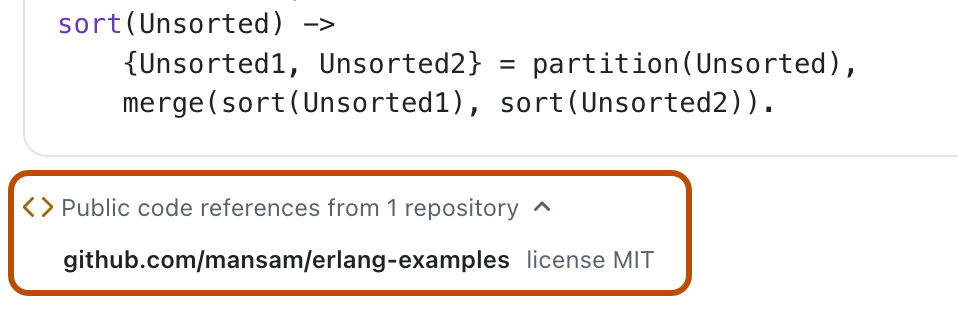
When Copilot Chat provides a response that includes code that matches code in a public GitHub repository, this is indicated beneath the code suggestion:
< > Public code references from n repositories
To see details of the matching code:
-
Click the "Public code references..." text, under the code suggestion.
A list of GitHub repositories containing matching code is displayed in a dropdown, together with licensing information, if found.
-
Click the name of a repository to display that repository on GitHub.com.

View code references for Copilot cloud agent
When Copilot provides a response that includes code that matches code in a public GitHub repository, this is indicated in the agent session logs with a link to display details of the matched code. For more information, see 에이전트 세션 관리.